Part 4 — Report Details · Chapter 4.19
Technician Visits per Job
This chapter explains the Technician Visits per Job report. The rules every report shares are in chapter 4.1.
What it shows
How many technician visits a job takes on average, for the jobs raised in each month, quarter or year. A figure of 1.4 means 10 jobs needed 14 visits. A rising figure means more return trips.
What you need to do to make it work
-
Classify your visit activities. A visit is an activity on the work order. An administrator opens Reports > Setup > Activity Classification, ticks each activity name that sends a technician on site, presses Classify Selected…, picks Technician visit under Counts As and presses Classify.
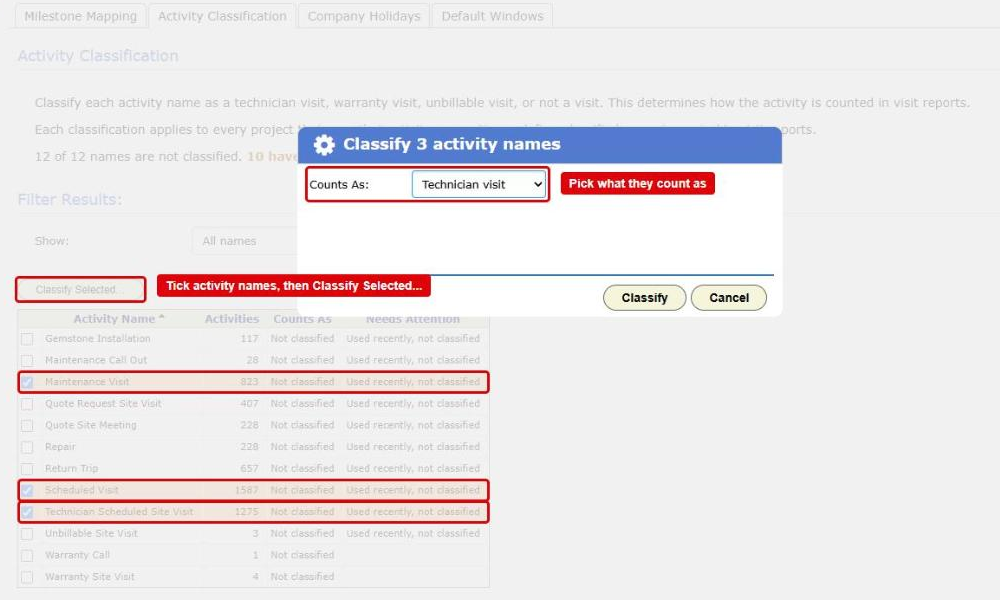
The Activity Classification tab in Reporting Setup with the Classify dialog open. The Classify Selected... button, three ticked activity names and the Counts As list are boxed in red Until a name is classified, its activities count as nothing, and a line under the chart says how many names are waiting. Classify office-only activities, such as quote meetings you hold by phone, as Not a visit. Warranty and unbillable visits have their own classifications and their own reports.
-
Use the same activity names for the same kind of visit. The classification goes by name, across every project. Return Trip and Return trip are the same name; Return Trip and Revisit are not.
Where the data comes from
- Your work orders, by the day each was made.
- The activities on them, by name.
How it is worked out
- Each work order raised in the period is a job.
- BigWave counts the job’s activities whose name is classified Technician visit.
- The figure is all those visits divided by the number of jobs.
A job with no visits counts as 0 and pulls the average down.
What counts
- Every visit activity counts, whether or not it has started. A visit scheduled for next week counts now.
- Only Technician visit counts. Warranty visit, Unbillable visit and Not a visit do not.
- A deleted or cancelled work order does not count.
- Projects narrows the report to the work orders in the projects you tick.
Which date puts it in a period
The day the work order was made, on your company’s calendar. Its visits count with it, whenever they happen.
Options
- Group By splits the figure by Customer, Region, Technician or Project.
- Show Top, Compare to last year and Show trend also appear for this report.
Checking a figure
Double-click a column, or press Chart Data, then View records on a row. The grid lists the work orders behind the figure. It does not list the visits: open a work order’s Schedule and Assign page to see them.