Part 4 — Report Details · Chapter 4.11
Quote Value by Role
This chapter explains the Quote Value by Role report. The rules every report shares are in chapter 4.1.
What it shows
The dollar value of the quotes in each month, quarter or year, split by the person who holds a work order role you pick. For example, pick Project Manager to see how much each project manager quoted.
Quotes Sent by Role (chapter 4.9) counts quotes. This report adds up what they were worth.
What you need to do to make it work
The report needs no milestone mapping. It reads the quote documents themselves. It does need these:
-
Give each quote its Quote Date and move it past Open. A quote counts once its status is Approved, Sent or Send Failure. A Draft or Open quote does not count. The Quote Date puts it in a month.
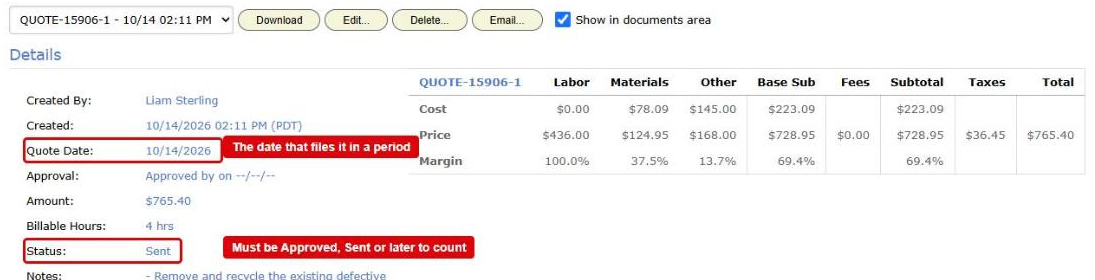
A quote on the Generated Invoices / Quotes tab. Its Quote Date and its Status are boxed in red: the date files it in a period, and the status must be Approved, Sent or later to count -
Set up your work order roles. An administrator names the roles in Actions > Setup > Details, on the Work Order Roles tab, and picks the people who can hold each one.
-
Put a person in the role on each work order. Open the work order’s Details panel and press Edit. On the Accounting tab of the dialog, pick the person under Work Order Roles and press Ok. A work order with nobody in the role counts under Unassigned.
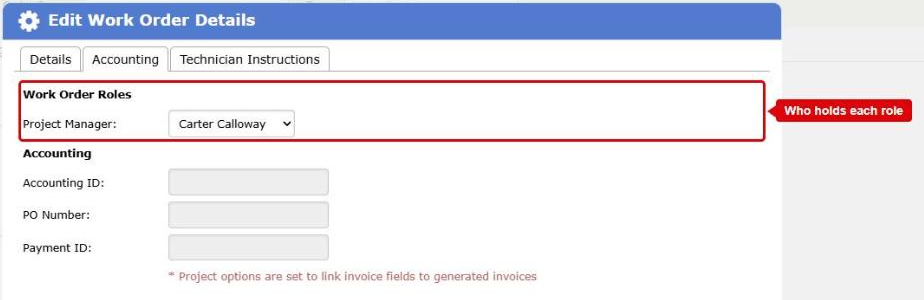
The Accounting tab of the Edit Work Order Details dialog. The Work Order Roles list, with a Project Manager picked, is boxed in red -
Delete or leave in draft a quote you replaced. Every sent quote counts, so a revision counts twice.
Before you start
- Pick Quote Value by Role in Report.
- Pick a role in Role. The list offers your company’s own active work order roles.
Until you pick a role, the report shows nothing.
Where the data comes from
- Your quotes. BigWave copies each quote with its quote date, its subtotal and the work order it belongs to.
- Each work order’s role assignments: who holds each role on it now.
How it is worked out
The figure is the sum of the subtotals of the quotes in the period. The subtotal is the amount before tax. Each quote counts under the person who holds the role you picked on its work order now.
What counts
A quote counts when all of these are true:
- It is a quote. Invoices and credit memos never count.
- Its status is Approved, Sent or Send Failure. Draft and Open quotes do not count.
- It has a quote date and a subtotal.
- It is not deleted.
- Its work order is not deleted, is not in a deleted project, and is not cancelled (chapter 4.1).
- Its work order’s project is one you ticked in Projects.
Some more rules:
- Every quote counts. A work order with a first quote and a revised one counts both. Delete or leave in draft a quote you replaced, or the figure counts it twice.
- The person is who holds the role now, not who held it when the quote went out. If you reassign a work order, its quotes move to the new person.
- A work order with nobody in the role counts under Unassigned.
- Approval by the customer does not change the figure. Quotes Approved by Role covers that.
Which date puts it in a period
The Quote Date on the quote. It is not the day the quote was made or approved. If you change the quote date, the quote moves to the new month after the next copy.
Who can see it
Only people whose role can see invoices in Accounting can see this report.
Options
- Role picks whose quotes the chart splits by.
- Show For sets month, quarter or year.
- Show Top keeps the people who quoted the most over the whole date range.
- Show trend draws an orange line through the average of each period and the two before it. It shows for months and quarters.
Checking a figure
Double-click a part of a column, or press Chart Data, then View records on a row. The grid lists each quote behind that figure, with its number, date and amount, and its work order, customer, project and region. Click a work order number to open it in a new tab.