Part 4 — Report Details · Chapter 4.13
Quote Approved to Invoiced
This chapter explains the Quote Approved to Invoiced report. The rules every report shares are in chapter 4.1.
What it shows
The average number of days from the customer approving a quote to the first invoice, in each month, quarter or year. It covers the whole job: scheduling, the work and the billing.
What you need to do to make it work
-
Map your quote statuses. An administrator opens Reports > Setup > Milestone Mapping and maps two kinds of status:
- the status that means the quote went out, such as QUOTE SUBMITTED, to Quote Sent
- each status that means the customer said yes, to Quote Approved
Tick the names, press Map Selected…, pick the milestone and press Map. Both are needed. An approval counts only after a quote went out, so a work order with no Quote Sent never counts as approved.
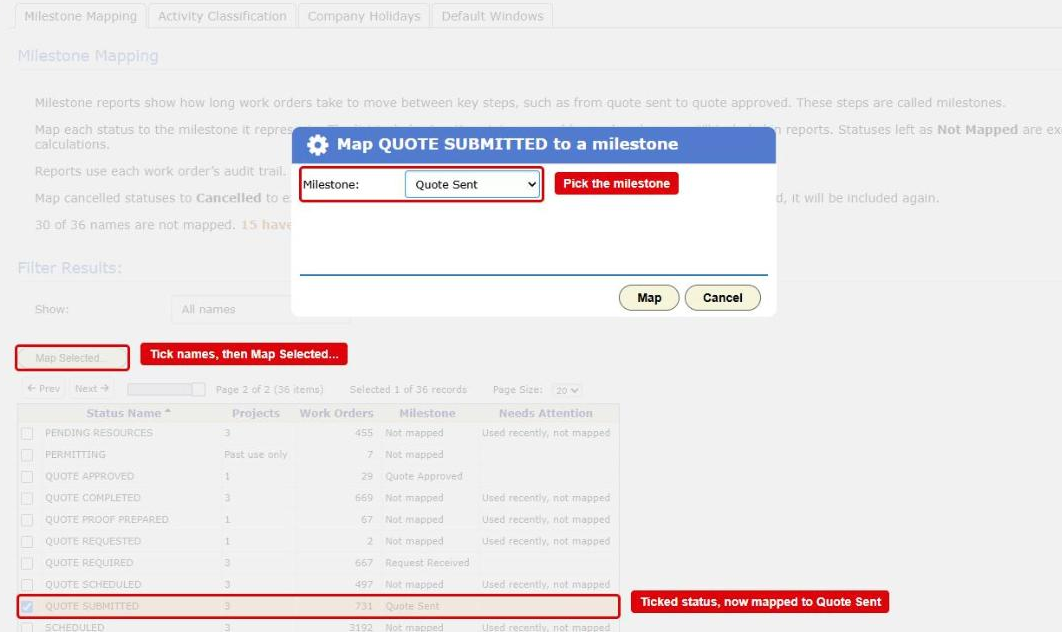
The Milestone Mapping tab in Reporting Setup with the Map dialog open. The Map Selected... button, a ticked status and the Milestone list are boxed in red Offices often show a yes by moving the work order straight on, to a status such as SCHEDULING REQUIRED. You can map those statuses to Quote Approved too. Work that was never quoted also reaches them, but it does not count, because it never reached Quote Sent.
-
Move the work order through those statuses as the quote goes out and comes back. The report reads the status changes. Approving the quote document itself does not count.
-
Approve and date each invoice. An invoice counts once its status reaches Approved and it has an Invoice Date.
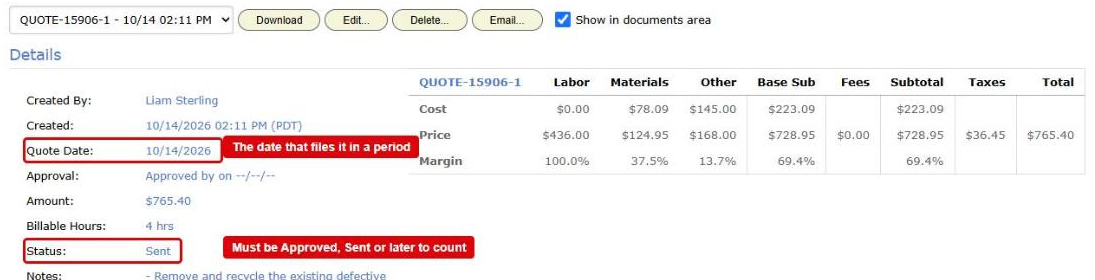
A document on the Generated Invoices / Quotes tab. Its date and its Status are boxed in red: the date files it in a period, and the status must be Approved, Sent or later to count -
For business days, enter your holidays in Actions > Setup > Holiday Schedule (chapter 2.1).
Where the data comes from
- The status changes on your work orders, from the audit log.
- Your invoices, with their invoice dates.
How it is worked out
For each work order:
- BigWave finds the first time it reached Quote Approved, counting only approvals at or after its first Quote Sent.
- It finds the first invoice dated on or after that day.
- The days between the two are the work order’s figure.
Each period shows the average of its work orders. Chart Data also shows the median.
What counts
A work order counts when all of these are true:
- It reached Quote Sent, and then Quote Approved.
- It has an approved, dated invoice on or after the approval.
- It and its project are not deleted, and it is not cancelled.
- Its project is one you ticked in Projects.
Work orders left out
A work order with an invoice but no approval before it is left out. That includes work that was never quoted. A line under the chart counts them, and View records lists them on the Left Out of Report tab with the reason. If they went through statuses nobody mapped, the reason names those statuses.
Which date puts it in a period
The invoice date.
Options
- Count picks Calendar days or Business days. Calendar days is the default.
- Group By offers Company, Customer, Region, Technician and Project.
Checking a figure
Press Chart Data, then View records on a row. Each work order shows when it reached Quote Approved and who changed the status, the invoice and its date, and the days between. Click a work order number to open it in a new tab.