Part 3 — Run Your Operation · Chapter 3.5
Invoicing & Getting Paid
Invoicing uses the work earlier chapters set up: time and materials from the field (chapter 3.3), rates that price each line (chapter 2.7), statuses that mark a job billable (chapter 2.3), and templates for the documents (chapter 2.8).
From work to invoice lines
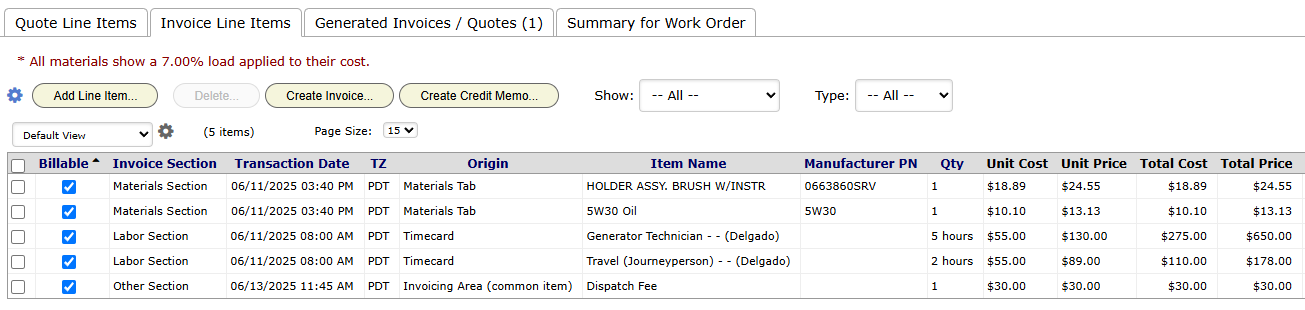
Invoices live on the work order’s Quote / Invoice panel, on the Invoice Line Items tab. When the job is done, most lines are already there. The Origin column shows where each one came from:
- the approved quote
- timecards
- materials entered in the field
- expenses
- supplier orders (chapter 3.7)
- lines typed by hand
To start from the quote, use the gear menu on the tab and pick Initialize from quote.
Grace’s job is to check the lines against the work and fix the odd one. Each line shows cost beside price, so she sees a thin margin before the invoice goes out.
Status drives billing
Every Beacon project has a status that means “done and ready to bill”, and one that means “invoiced”. That gives Grace a worklist:
- Her view (chapter 1.3) shows work orders in Complete, oldest first.
- When she invoices a job, she moves it to Invoiced, and it leaves her view.
- A stale-status alert on Complete (chapter 2.9) flags jobs that sit unbilled.
Creating and sending the invoice
- On Invoice Line Items, click Create Invoice…. BigWave builds the document from your invoice template.
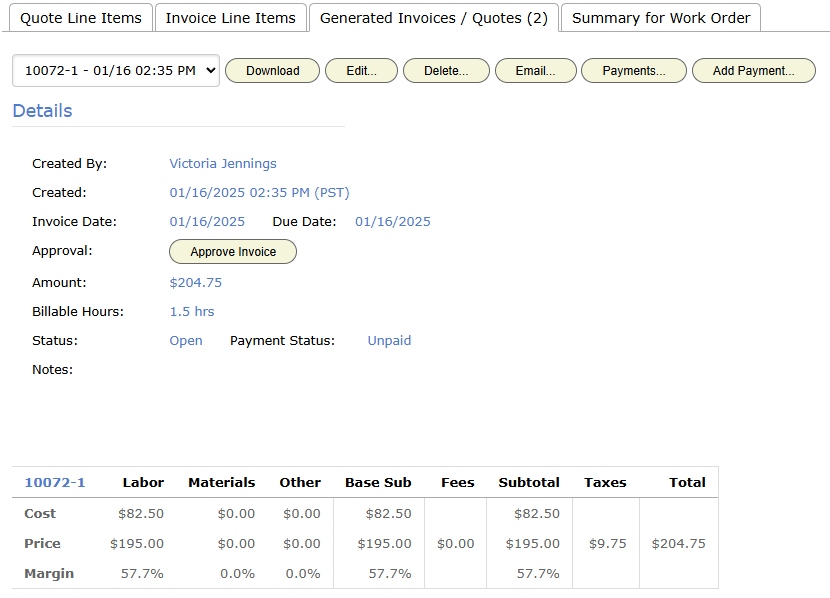
- Open the Generated Invoices / Quotes tab and pick the new invoice.
- Click Approve Invoice under Details.
- Click Email… to send it. The email uses your HTML template (chapter 2.8).
The invoice has its own status, separate from the work order’s: Draft, Open, Approved, Sent. Invoice numbering and other company defaults are under Actions > Setup > Invoicing (chapter 2.1).
Customers with a portal login see approved invoices on their work orders (chapter 2.10).
Commercial (Harbor Grill): Harbor Grill pays only against a PO number. The inspection project makes the PO custom field required before invoicing (chapter 2.6), and the invoice prints it. Harbor Grill uses one blanket PO for the year, so every invoice carries the same number. Grace also checks that the signed report deliverable is complete. She sees it on the same work order.
Residential (the Okafors): Grace builds the invoice from the approved quote, adds what changed on the job, and emails it the day the work closes.
Payments and credit memos
To record a payment, pick the invoice on the Generated Invoices / Quotes tab and click Add Payment…. Payments… lists what that invoice has received. The customer’s Payment History panel (chapter 2.4) then shows what was billed, paid and still owed.
To reduce an invoice after it is sent, click Create Credit Memo… on Invoice Line Items. The credit memo is its own document, so the original invoice stays as it was. BigWave logs every payment and status change, with who made it.
Accounting and export
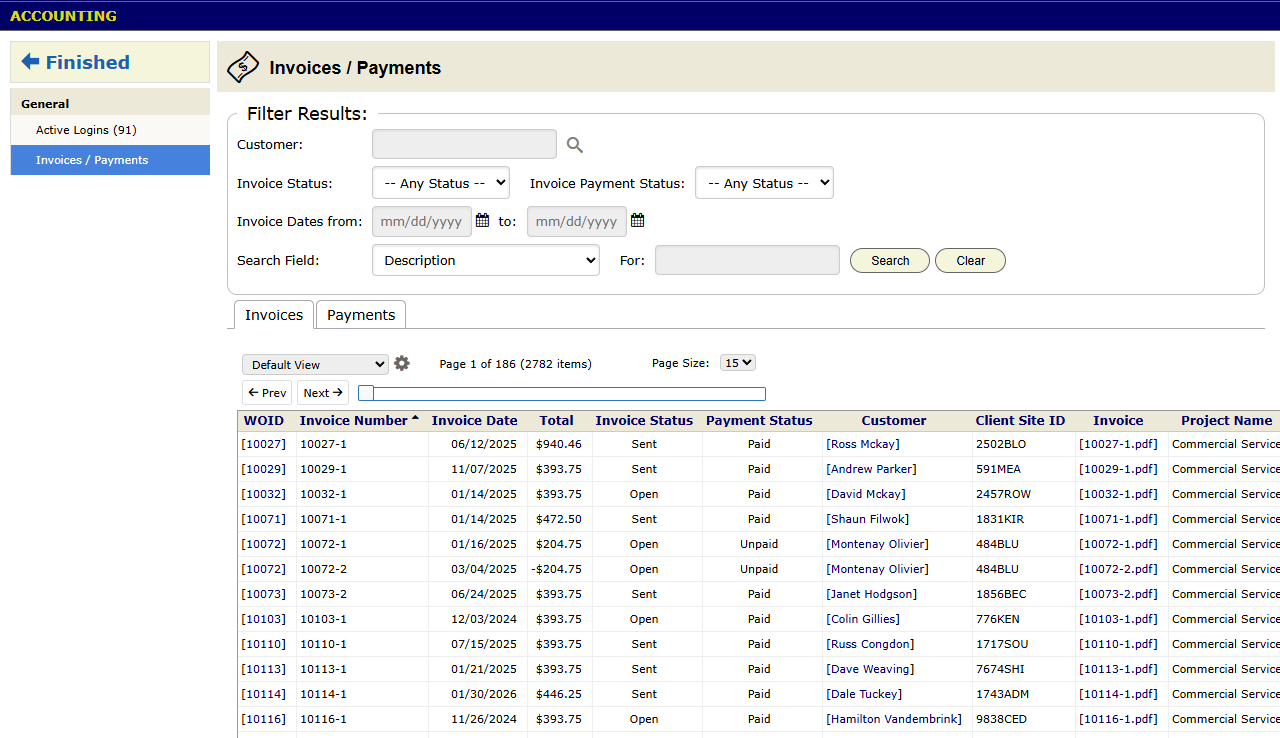
The Accounting screen is on the Actions menu. Its Invoices / Payments report lists invoices and payments across all projects.
Your general ledger stays in your accounting package. To get invoices there:
- QuickBooks. Connect it under Actions > Setup > QuickBooks.
- Other packages. Export the invoice lines and import them on the accounting side.
Checklist
- Give every project a billable status and an invoiced status. Build the billing view on day one.
- Put a stale-status alert on the billable status.
- For commercial customers, require the fields and deliverables their payables department asks for.
- Record payments when they arrive, so Payment History and the portal are correct.
- Export to accounting on a schedule, and reconcile each month.