Part 5 — Reference · Chapter 5.3
Merge Field & Field Code Reference
This page explains the bracketed codes that put live data into:
- generated documents (chapter 2.8)
- HTML quotes, invoices and alert emails (chapters 12 and 13)
- naming patterns for deliverable files and invoice numbers
The list of fields is long and grows with the product, so this page does not repeat it. Download the current list from inside BigWave.
How codes work
There are two kinds of code:
- Merge fields go in Word templates. You insert them as Word merge fields, named after the BigWave field.
- Field codes go everywhere else: HTML templates, alert emails, email subjects and naming patterns. A field code is a field name in square brackets, such as
[FieldName].
When BigWave generates the document or sends the email, it reads the record, usually a work order, and puts each field’s value in place of the code. The rest of this page is about field codes, except where it says otherwise.
If BigWave cannot fill a field code, it leaves the code in the output as you typed it. So a mistake shows up in a preview.
Find the field names
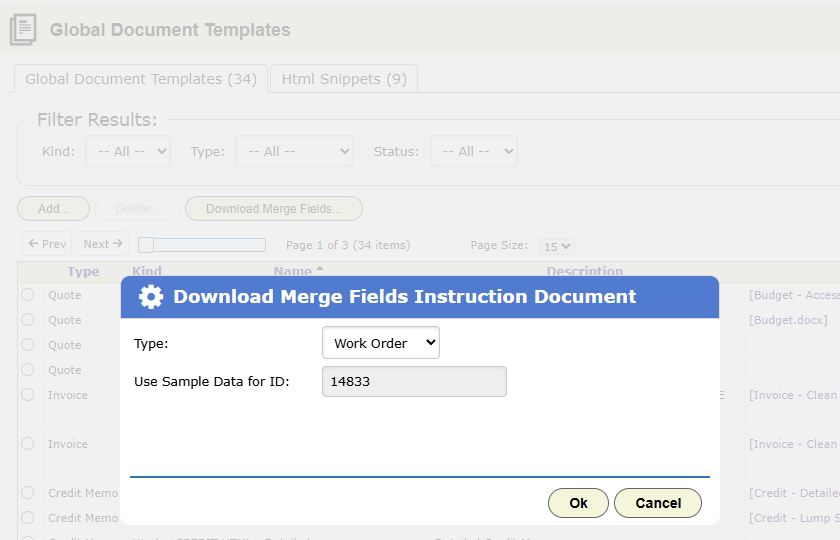
Open Actions › Setup › Document Templates, or Document Templates in Project Setup. Click Download Merge Fields….
- Pick a Type, such as Work Order or Invoice.
- In Use Sample Data for ID, enter the ID of a real record.
- Download the document.
The document lists every field for that type, with the sample record’s value next to each one.
The fields reach everything connected to the work order:
- Work order: ID, description, status, dates, notes
- Customer and site: names, addresses, contacts, IDs
- Project and company: project details, and your company details for headers and footers
- Schedule and assignment: scheduled dates and assigned technicians
- Money: line items, totals, invoice and quote numbers, PO number
- Custom fields: every field you defined in chapter 2.6
For a custom field, copy its name exactly from its definition.
Format a value
In a field code, add a pipe and a format after the field name: [FieldName|format].
For dates:
| Format | Result |
|---|---|
date | the date only |
time | the time only |
datetime | date and time |
MMMM d, yyyy | a pattern you write, such as March 4, 2026 |
For numbers:
| Format | Result |
|---|---|
currency or money | a dollar amount, such as $1,250.00 |
number | two decimal places |
percent | a percentage |
If a format does not suit the value, for example a date format on a number, BigWave leaves the whole code in place.
In customer documents, set the format of every date and amount. Use the same formats in all your templates so your paperwork matches.
Repeat and show sections
HTML templates can repeat a section and show a section only when a condition holds:
[#each ...]…[/each]repeats the section once per item, for example once per line item on an invoice.[#if ...]…[#else]…[/if]shows one section or the other.
If a template has a syntax error, the preview shows an [error: ...] message with the line number.
Naming patterns
Naming patterns use the same codes, as plain text.
- A deliverable’s Naming Pattern renames every file uploaded to it (chapter 2.8). A pattern of site ID, document name and year gives filenames that sort by site.
- Setup › Invoicing holds the naming patterns for invoice, quote and credit memo numbers (chapter 3.5).
The status action token
Put this token in an HTML email template:
[WOStatusAction status="Approved"]The token becomes a unique web address. It does not make a button by itself. Put it in the href of your own link or button.
When the recipient clicks the link, a confirmation page opens. When they confirm, the work order moves to the named status. BigWave matches the status by name in the work order’s project. The name must exist in that project’s status list, spelled the same way.
The token takes two settings. Use either or both.
status="..."sets the status a confirmed click applies.snippet="..."names an Html Snippet to show as the confirmation page. This lets you brand the page and put the real buttons on it. Inside the snippet, each button is a plain[WOStatusAction status="..."]token.
The plain form, with status only, suits a simple approve link. The snippet form builds the branded approve-or-decline page from chapter 3.4.
Snippets live in Actions › Setup › Document Templates, on the Html Snippets tab.
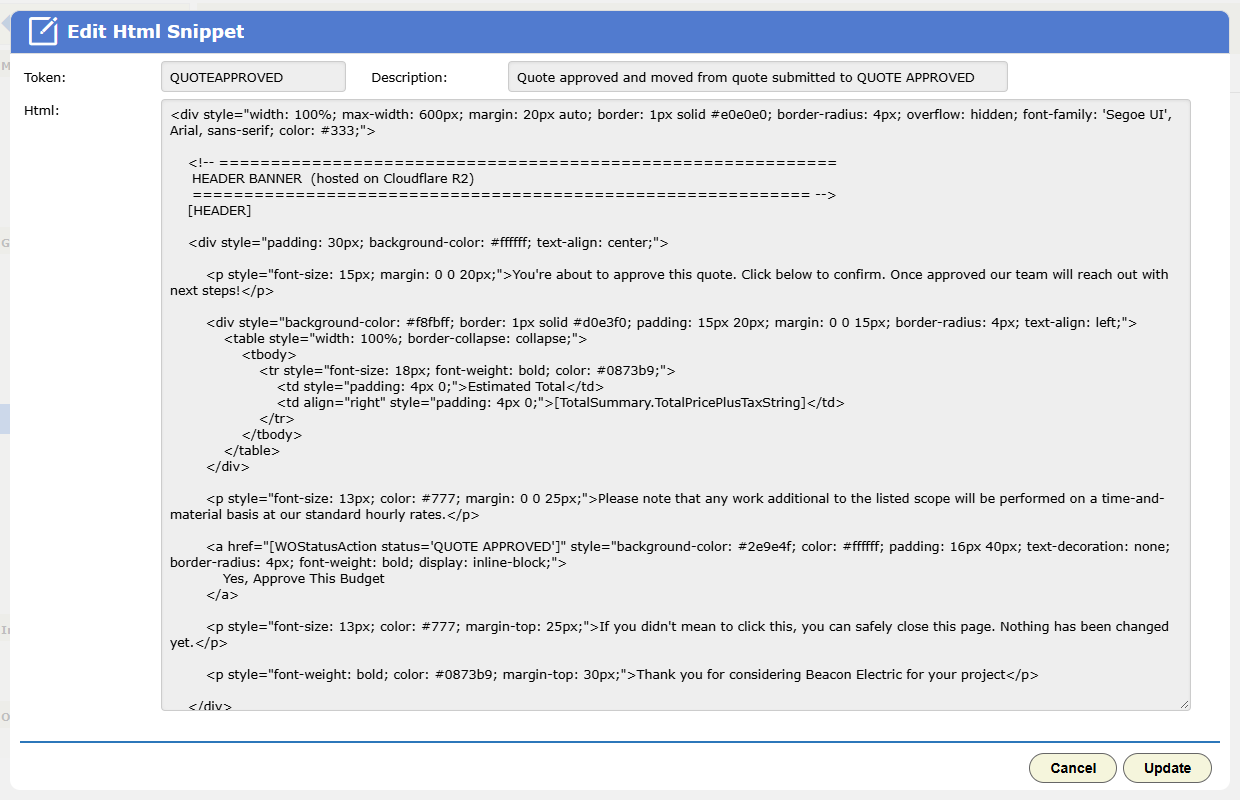
Each emailed link belongs to one work order. The confirm step is there because some email security tools open every link in a message.
Practical notes
- Build each template against a real work order, and preview it before you use it.
- After you rename a status, search your templates for the old name. Status action tokens find statuses by name.