Part 3 — Run Your Operation · Chapter 3.4
Quoting & Estimating
A quote in BigWave is a set of line items on the work order that will do the job. The customer sees them before the work. When the customer approves, the same lines become the start of the invoice, so nobody types them twice.
Where quoting happens
Open the work order and click Quote / Invoice in the left panel. Only office users see this panel. It has separate tabs for Quote Line Items and Invoice Line Items, and the same tools build both.
- An estimate is your own number. You enter lines to see cost and price before you commit.
- A quote is what you send the customer for approval.
- The invoice (chapter 3.5) comes after the work. It starts from the quote and adds what the job used.
Lines come from the setup in chapter 2.7:
- the project’s contract rates
- the materials database, with the project’s preferred materials first
- Assemblies, which add a set of parts and labor in one step
- a typed line, for anything else
Each line carries a cost and a price. You see the margin. The customer sees only the price.
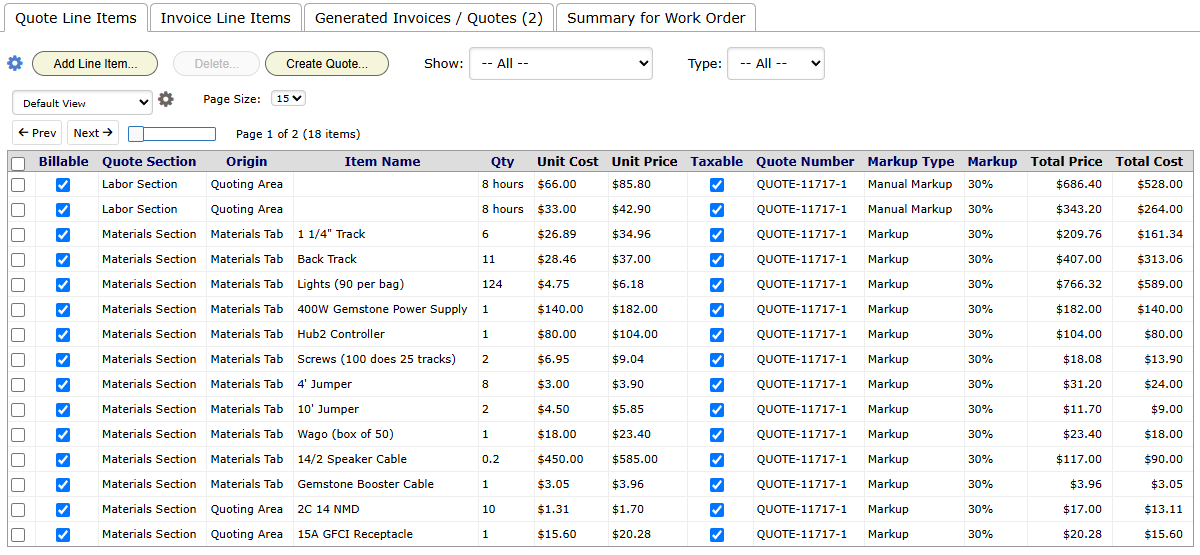
Building the Okafor quote
Steve looked at the Okafors’ flickering lights and recommended a new panel. Priya quotes it.
- She creates a work order in Residential Service: “Panel upgrade to 200A”.
- On Quote / Invoice, she adds the 200A panel from materials, the labor hours at the standard rate, and the permit fee.
- She clicks Create Quote…. BigWave builds the quote document from the quote template (chapter 2.8).
- She emails it to the Okafors from BigWave and moves the status to Quoted.
Every price comes from setup, so the quote takes a few minutes.
Commercial (Harbor Grill): the annual inspections are priced by contract, so Beacon does not quote them. Priya quotes extra work, such as a panel replacement an inspection turns up. The steps are the same. The lines start from contract rates, and the email goes to the facilities manager.
Quoting with Assemblies
An Assembly (chapter 2.7) is a saved set of parts and labor. One Assembly line can replace a dozen loose lines on a quote. You add Assemblies on the work order’s Time / Materials / Expenses panel.
Add an Assembly to the quote
- Open the work order. In the left panel, click Time / Materials / Expenses.
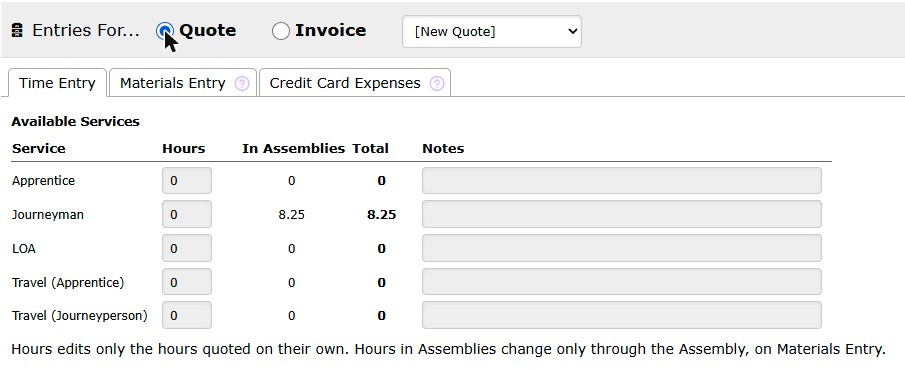
- Next to Entries For…, click Quote. For work already done, click Invoice.
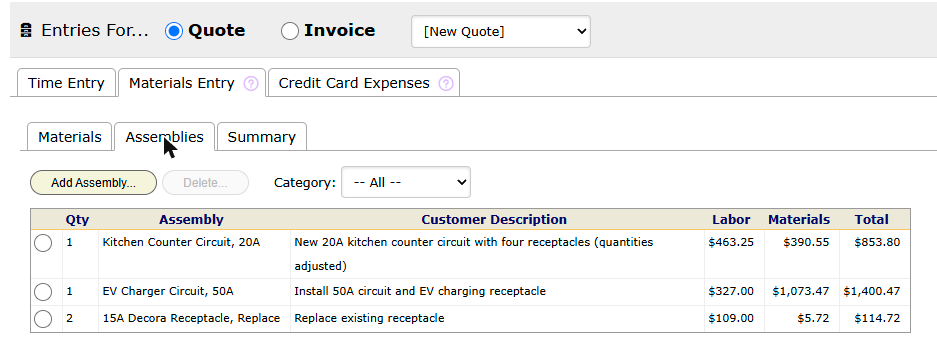
- Click the Materials Entry tab, then the Assemblies tab.
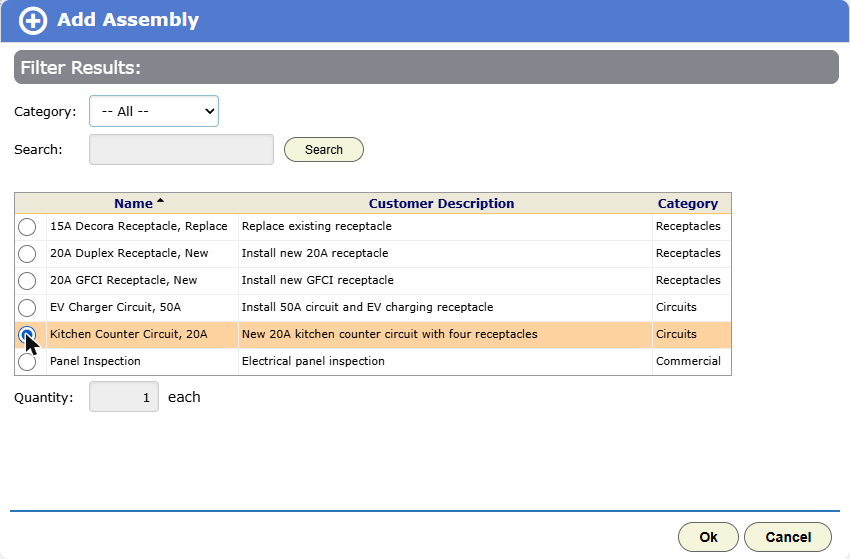
- Click Add Assembly….
- Find the Assembly. Pick a Category, or type in Search and click Search.
- Click the Assembly’s radio button.
- Type the Quantity.
- Click Ok.
The line takes the Assembly’s quantities and unit costs. The grid shows its labor price, its materials price and the total.
Adjust the quantities on one line
Jobs differ. This kitchen needs 25 feet of cable to each receptacle instead of 15. You change it on the line, and the Assembly in the catalog stays as it is.
- On the Assemblies tab, click the line. The Adjust Quantities dialog opens.
- In Qty Each, change the amount of any part. This works inside nested Assemblies too.
- If your role shows costs, you can also change a part’s Unit Cost.
- Change the Customer Description if this job needs other words on the quote.
- Click Save.
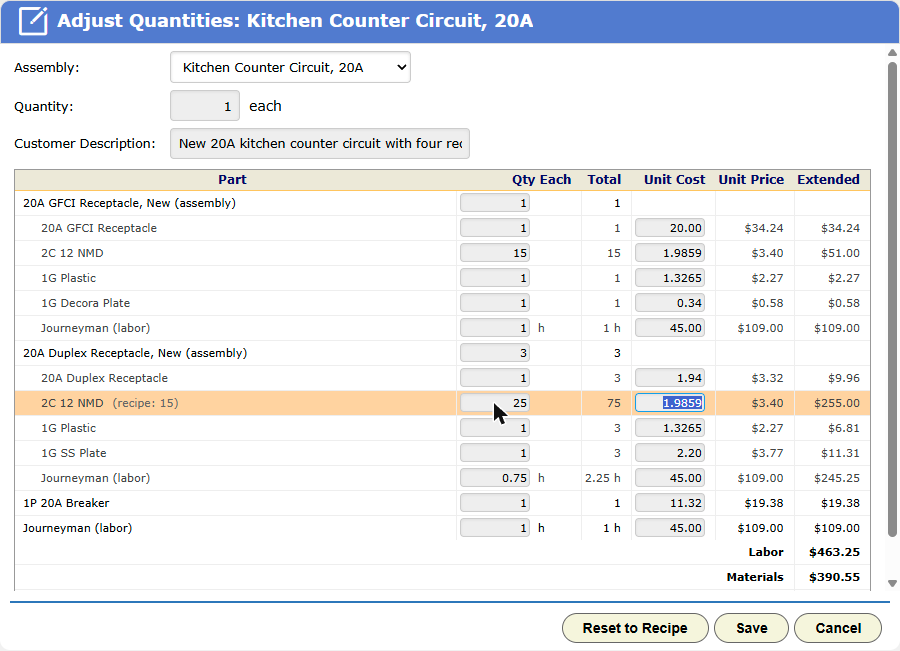
A changed part is highlighted and shows its catalog value. The Unit Price, Extended, Labor, Materials and Total figures update as you type. On the grid, the line’s description gets “(quantities adjusted)”.
Points to know:
- You cannot add or remove a part here. To add one, add a loose material on the Materials tab.
- Reset to Recipe puts back the catalog quantities and unit costs.
- The Assembly list at the top swaps the line to a different Assembly. Your adjustments are lost, and BigWave asks first.
- To remove a line, click its radio button, then click Delete….
Where the line shows up
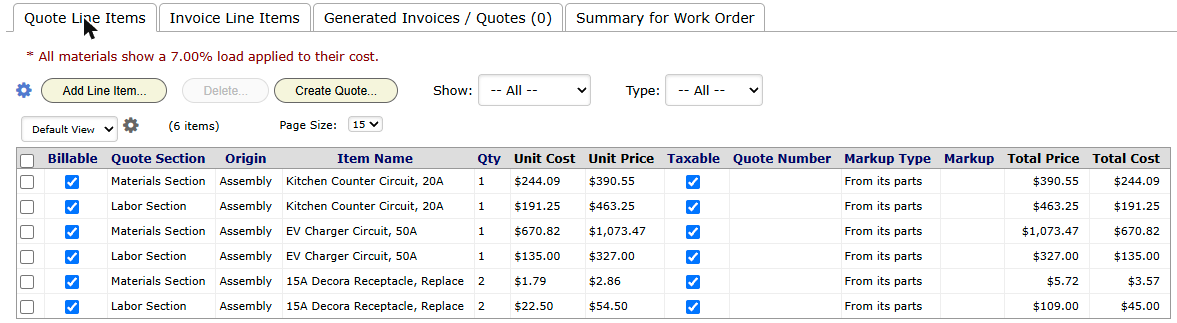
Quote / Invoice. Each Assembly line becomes up to two rows: one in the Labor Section and one in the Materials Section. Origin shows “Assembly” and Markup Type shows “From its parts”. To change quantity or price, go back to Materials Entry.
The printed quote. The customer sees the Customer Description in each section. The parts do not print.
Quoted hours. On the Time Entry tab in quote mode, the In Assemblies column shows the labor hours inside the Assemblies, by service. Total adds them to the hours you quote on their own.
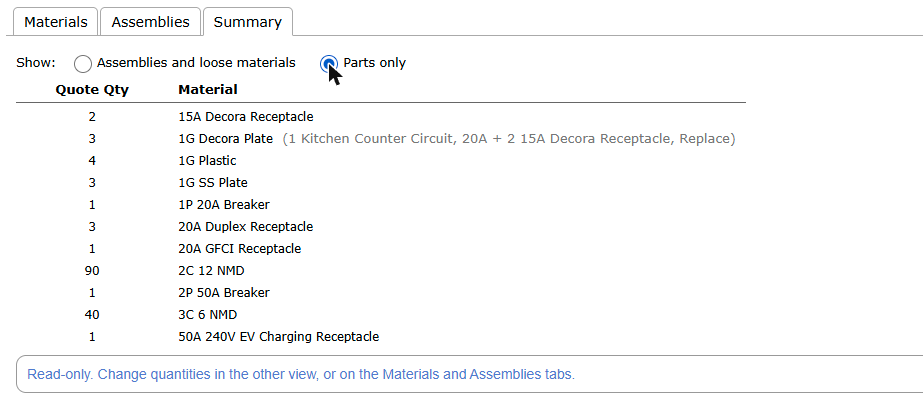
The parts list. On Materials Entry, the Summary tab has a Show choice. Assemblies and loose materials lists each line as entered. Parts only totals every material across all lines. Use it to order parts or load the truck.
From quote to invoice
Assembly lines copy to the invoice like any other line. Watch for double billing. If a technician also enters the same parts or hours on the invoice side, both bill.
Technicians can add and adjust Assembly lines on the phone too (chapter 3.3). The phone shows quantities only. BigWave adds the prices when the phone syncs.
Role note: a role without the cost credential can still add and adjust Assembly lines. It sees quantities, and prices if it has pricing access. It does not see unit costs.
Approval by email
Chapters 7, 12 and 13 each set up one piece of this. Together they work like this:
- The quote’s email template has an Approve button. This is a status action button that moves the work order to Approved. You can add a Decline button for a rejected status.
- The Okafors open the email on their phone and tap Approve.
- A confirmation page opens, and they confirm. The second step stops email scanners from approving a quote by opening its links.
- The work order moves to Approved. The Okafors do not need a login.
- The status change sends Priya an alert (chapter 2.9). She puts the job on Thursday’s calendar (chapter 3.2).
The approval is a status change with a date and time. It shows in the work order’s Audit Trail like any other change.
Some quotes get no answer. Make a view of work orders in Quoted, and add a stale-status alert so old quotes get a follow-up.
Habits
- Quote on the work order that will do the work. Do not keep quotes in a spreadsheet.
- Price quotes from rates and materials. If you type the same line again and again, make it a rate (chapter 2.7).
- Put the approval buttons in the quote email template from the start.
- Give the Quoted status an owner and a stale-status alert.