Part 3 — Run Your Operation · Chapter 3.6
Assets & Recurring Maintenance
An asset is a piece of equipment you service at a customer site, such as a panel, an emergency light or a generator. BigWave keeps a history for each one. Asset Scheduling then creates the recurring maintenance work orders for those assets on a set cycle. Nobody has to remember that Harbor Grill’s inspections are due.
Asset management is a licensed feature. If your company has it, Asset Types shows under Home > Manage.
Asset types
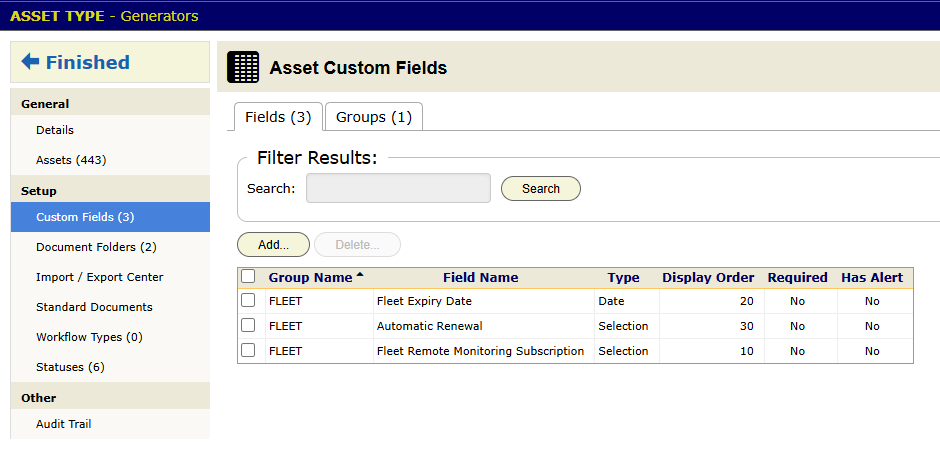
An asset type is a kind of equipment: Electrical Panel, Emergency Lighting Unit, Generator. The type decides what its assets carry. Its Setup panels are:
- Custom Fields for the equipment’s data, such as amperage, breaker count or battery date.
- Statuses for where the asset is in its life: In Service, Needs Repair, Retired.
- Standard Documents, the documents every asset of this type should have on file, such as a commissioning report.
- Document Folders and Workflow Types.
- Import / Export Center, for loading assets in bulk.
An internal asset type, for your own equipment, also has Show On Resource Calendar on its Details. Types for customer equipment do not show this field. Turn it on for equipment you dispatch, like the bucket truck, so it can be assigned on the calendar (chapter 3.2). It has no effect on maintenance.
Assets
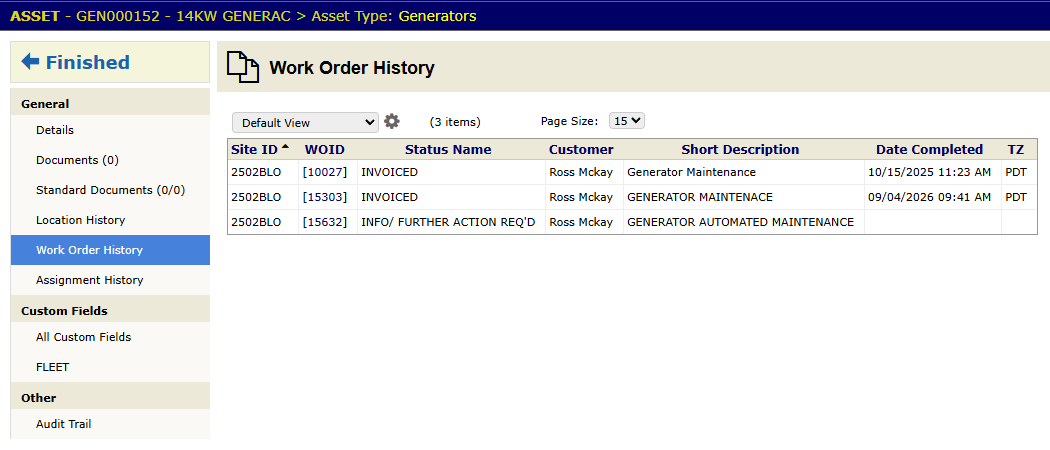
You add assets at a customer site, from the site’s Assets panel or by import. Each asset has its details, its custom field values and its documents. It also keeps three histories:
- Location History, since equipment moves.
- Work Order History, every job that touched it.
- Assignment History.
A work order links to the assets it services (chapter 3.1). Those links build the asset’s history. If a Harbor Grill panel fails inspection twice in three years, its record shows both jobs, and that backs up the replacement quote.
Commercial (Harbor Grill): Beacon imported each site’s panels and emergency lights from a spreadsheet when Harbor Grill signed on (chapter 3.8). Serial numbers, amperage and install dates are custom fields.
Residential (the Okafors): when Steve closes the upgrade job, he registers the new 200A panel as an asset at their site. Beacon will service that panel for years, and its history starts now. An annual check later needs only a schedule.
Asset Scheduling
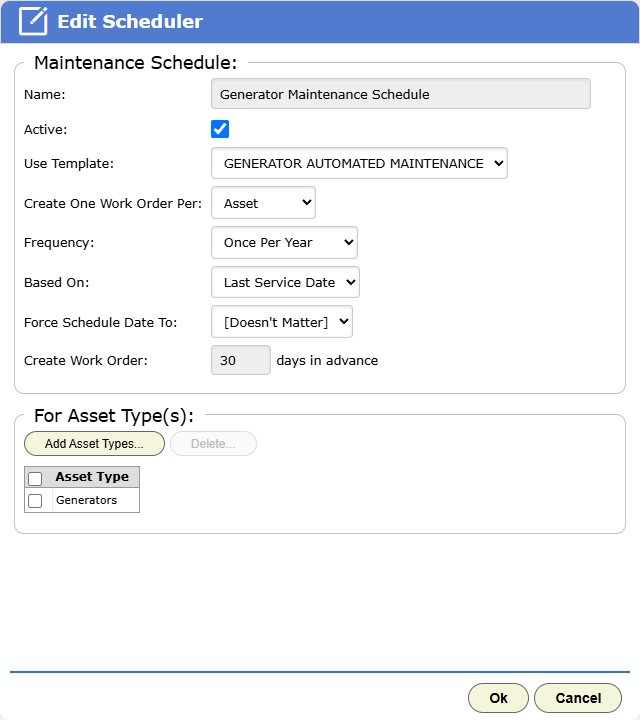
Open the project and click the Setup tab. In the left panel, click Asset Scheduling. Each schedule opens in the Edit Scheduler dialog and sets:
- Use Template: the work order template for each new job.
- Create One Work Order Per: site, asset or asset type.
- Frequency: weekly, monthly, quarterly, twice a year or once a year.
- Based On: the asset’s in-service date, its last service, or a start date.
- Force Schedule Date To: a day of the week, if the customer wants visits on one day only. Leave it at [Doesn’t Matter] otherwise.
- Create Work Order … days in advance: how early the work order appears.
- the asset types the schedule covers.
From then on BigWave creates the work orders in the project, on time, ready to dispatch like any other job (chapter 3.2). It does not create a second work order for a schedule while one is still open.
To pause one asset, clear Eligible For Scheduling on its details. The asset stays in grids, reports and history. BigWave just stops creating work for it, which suits a site under renovation. Turn the flag back on and the schedule picks up from its saved dates.
The missed-date alerts (chapter 2.9) and Scheduled Events (chapter 3.2) show whether the generated work gets done.
Parts in stock
If you stock parts, set up your warehouses under Actions > Materials Management > Warehouses. They work with the materials database (chapter 2.7) and supplier orders (chapter 3.7). If you do not hold stock, skip this.
Checklist
- Make asset types only for equipment you service again and again.
- Fill in the type’s custom fields with real data. The tech needs to know which panel, and where it is.
- Import assets when a customer signs on, while their equipment list is at hand.
- Set the Force Schedule Date To day before the first work order is created.
- To pause an asset, clear Eligible For Scheduling. Do not delete it, or its history goes with it.