Part 4 — Report Details · Chapter 4.6
Active and Quiet Customers
This chapter explains the Active and Quiet Customers report. The rules every report shares are in chapter 4.1.
What it shows
Two bars. Active counts the customers you invoiced in the last few months. Quiet counts every other customer, including customers you never invoiced.
The answer is a list of customers, so the records behind each bar matter more than the chart. Use it to find customers to call before you lose them.
What you need to do to make it work
-
Approve and date your invoices. A customer is active only through an approved invoice: status Approved, Sent or Send Failure, with an Invoice Date. A draft or open invoice does not make a customer active.
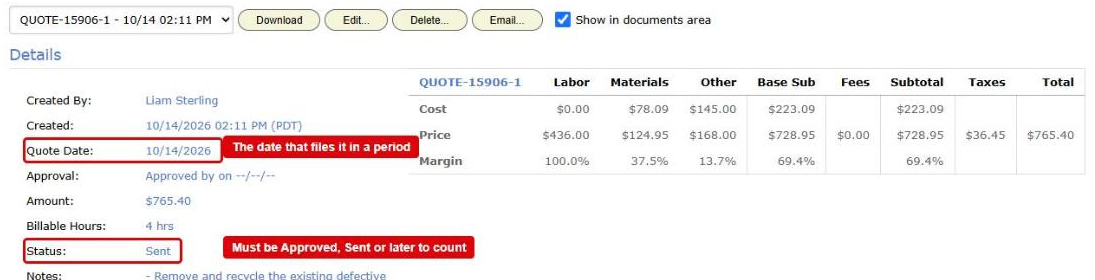
A document on the Generated Invoices / Quotes tab. Its date and its Status are boxed in red: the date files it in a period, and the status must be Approved, Sent or later to count -
Raise each job under the right customer. The report finds a customer’s invoices through the work orders. An invoice on a work order raised under a different customer record makes that other customer active.
-
Optional: set your default window. An administrator can change how many months Invoiced Within starts at, in Reports > Setup > Default Windows. The default is 12.
Where the data comes from
- Your customers, active or inactive.
- Your invoices: each invoice’s date and the work order it belongs to.
- Your work orders, for their customer and project.
How it is worked out
- BigWave takes one day, the as of day. It is today, or 31 December of the year in As Of Year if that year has ended.
- It finds the last day each customer was invoiced, on or before that day.
- A customer invoiced within the number of months in Invoiced Within counts as active.
- Every other customer counts as quiet. A customer never invoiced counts as quiet too.
The chart title says the day and the number of months, and how many customers were never invoiced. For example: “active means invoiced in the 12 months to 10/22/26; 4444 never invoiced, counted as quiet.”
What counts
- Every customer counts. An inactive customer counts too. It is usually quiet.
- Only approved invoices count, the same ones Invoice Amounts counts: Approved, Sent or Send Failure, with an invoice date. A draft or open invoice does not make a customer active.
- Quotes and credit memos do not count. Only invoices do.
- An invoice on a cancelled or deleted work order does not count.
- Projects narrows the customers. With projects ticked, the report lists only customers with work in those projects. It reads only the invoices on that work.
Which date decides
The invoice date, on your company’s calendar. A customer invoiced on the first day of the window is still active.
Options
- As Of Year sets the day the report looks back from. Pick the current year to look back from today. Pick an earlier year to see how things stood on 31 December of that year.
- Invoiced Within (months) sets how far back an invoice still makes a customer active. The default is 12. An administrator can change the default in Reports > Setup > Default Windows.
- The report has no Show For or Group By. It is one snapshot on one day.
Checking a figure
Press Chart Data, then View records on the Active or Quiet row. The grid lists each customer with:
- Last invoiced: the date of the customer’s last invoice, or “never”.
- Counted as: “active”, “quiet”, or “quiet: never invoiced”.
Sort by Last invoiced to see who went quiet most recently.