Asset Setup and Management
The BigWave Asset Management add-on allows the creation of Asset Types. Asset Types are created from your homepage within BigWave (internal users only).
To Create an Asset Type…
-
Click the Asset Types option
-
Click the Add button
-
On the ensuing dialog enter an asset name and click Ok
-
Below we can see two asset types have been created. These are Distribution Transformer and Pin Pad.
-
A count of the number of assets for each type is displayed.
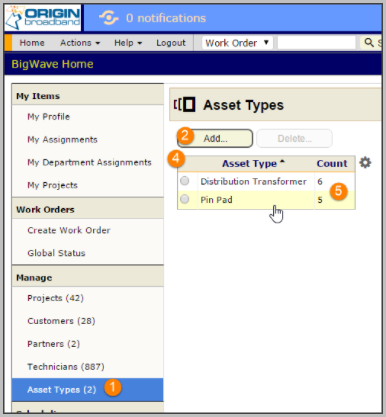
Click the Pin Pad asset type above to open its configuration page.
-
The Details section enables you to change the name of the asset type
-
The Assets section shows all assets created for this asset type
-
The Custom Fields section enables definition of field specific to the asset type
-
The Import/Export Center enables bulk upload of asset information including custom fields
-
The Audit Trail captures any changes done for the asset type
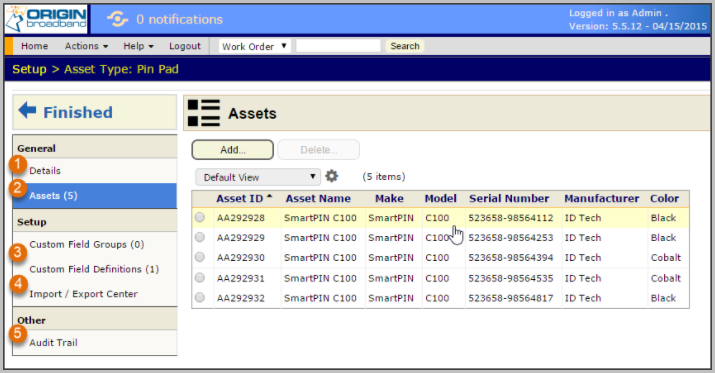
Above we can see there are 5 pin pad assets defined.
Click a row to open the asset page.
-
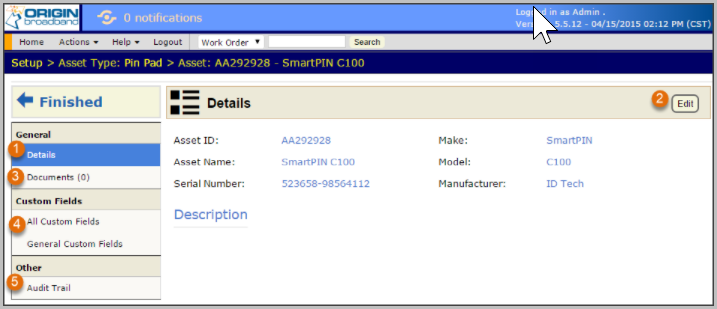
Change standard fields for the asset under the _Details _section
-
Click the edit button to change standard asset fields
-
_Documents _may be uploaded for the asset. For example you could upload pictures of the asset.
-
Enter custom field values for the asset.
-
The Audit Trail captures all changes done against an asset.