Catching Duplicate Customers Before They Happen
Anyone who’s run a service desk has watched this happen. A spouse calls in under her own name, at an address that’s already in the system, and now there are two records for what’s really one household. Or someone writes “Bill” when the guy on file is William. Or an address gets typed with “St” instead of “Street,” and the system has no idea it’s looking at the same house twice.
None of that is intake’s fault. It’s just what happens when people type things by hand, fast, on the phone. But it piles up, and eventually you’re invoicing the wrong record, or a tech shows up on a job and the account history isn’t there because it’s sitting under a different customer.
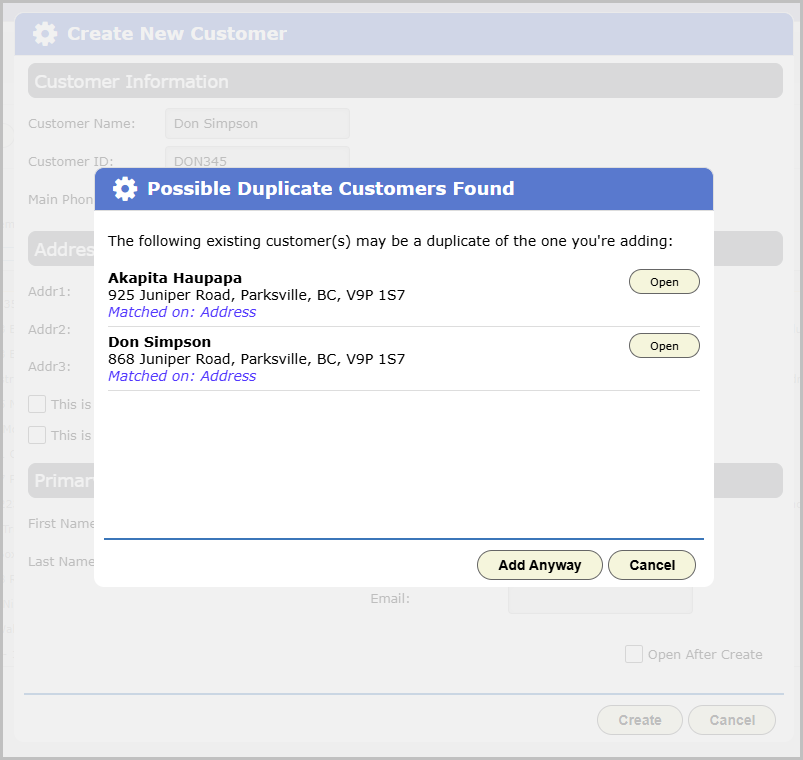
Add Customer now catches this before you hit save. Try to add a new customer that looks a lot like one you already have, and you’ll see a warning right there: why it looks like a match, and which existing customer it’s pointing at. If it really is a new customer, dismiss the warning and go ahead. If it isn’t, back out and use the record you already have. Either way, if you add the customer anyway, a note gets left behind so there’s a trail if the question comes up again later.
What it’s actually looking at
BigWave compares a handful of things about the new customer against everyone already in the system, active or inactive: the address, the name, the phone number, and, if you’re bringing customers in from another system, the ID that system uses for them.
A close match on any one of those is enough to raise a flag on its own. An address that’s close enough, even with a typo or a different abbreviation, will do it. So will a name, first and last, whether it’s spelled exactly the same or it’s a nickname BigWave already recognizes, like Bill for William. So will a phone number, whichever line it’s on. And if two systems agree on the same customer ID, that’s about as sure a match as you’re going to get.
It still knows a homeowner from their side business
One thing hasn’t changed: a homeowner running a small business out of the house shows up as two different customers, one for the business and one for them personally, and that’s exactly right. Same address, maybe even the same phone number, and BigWave won’t confuse the two, because one of those records has a company name on file and the other doesn’t. That difference is enough to tell BigWave these are two separate customers who just happen to live in the same place.
What about someone with two homes?
Here’s a case worth knowing about. Say William Buckley already has a customer record for his house on Elm Street, and now a second record shows up for a William Buckley at a lake house he owns. You might expect that to slide by the same way the homeowner-and-business case does. It won’t. BigWave will flag it.
That’s because a second property for an existing customer isn’t supposed to be a new customer at all. It gets added onto the customer record that’s already there. So two separate customer records under the same name, at two different addresses, aren’t really a case of one person with two houses. They’re either a duplicate that should have been one customer with two properties, or two different people who happen to share a name. Worth a second look either way.
Where you’ll see this today
Right now, this only shows up on the Add Customer screen, the one place someone’s actually looking at the result and can decide what to do with it. If you’re bringing customers in some other way, through an import or an automated billing process, you won’t see this warning.
Nothing to turn on, nothing to configure. If you’re adding customers by hand in BigWave, this is already watching for you.