See What Each Quote and Invoice Holds, Right Where You Enter It
A work order often gets more than one quote. The first one goes out, the customer adds a room, and a second quote follows. The same goes for invoices: a deposit, a progress bill, a final bill.
Until now, the Time / Materials / Expenses screen showed every line on the work order at once. You couldn’t tell which lines were already on a quote you sent, and which were new.
Now a drop-down beside Quote and Invoice sorts that out.
New lines, on their own
Open a work order and click Time / Materials / Expenses. Pick Quote or Invoice. The drop-down next to them starts on [New Quote] or [New Invoice].
In that view you see only the lines no quote or invoice holds yet. That’s your working area. Add time, materials and Assemblies as always, and when you create the next quote or invoice, these are the lines it will pick up.
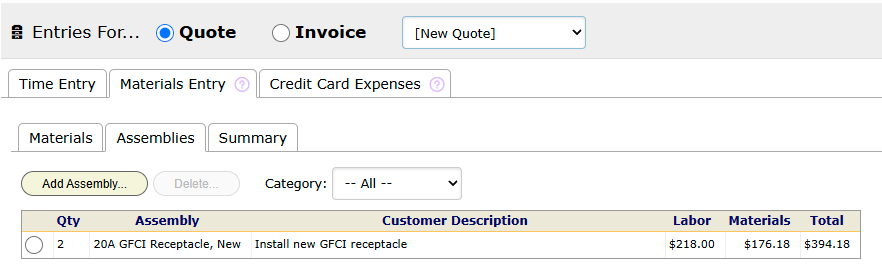
Materials you already billed start at 0 here, so you don’t bill the same box twice by accident.
Look back at a quote or invoice
Open the drop-down and pick a quote or invoice you already made. The list shows them newest first, by number.
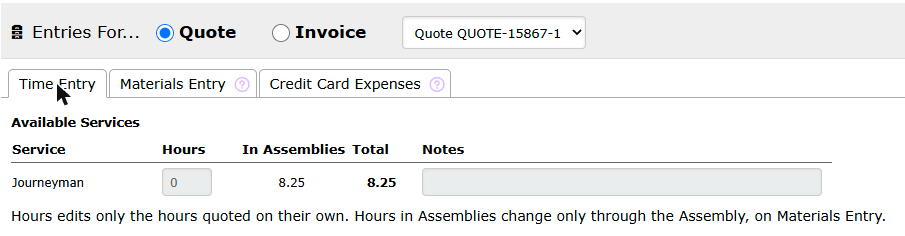
BigWave then shows only that document’s lines, on every tab: Time Entry, Materials Entry with its Materials, Assemblies and Summary tabs, and Credit Card Expenses.
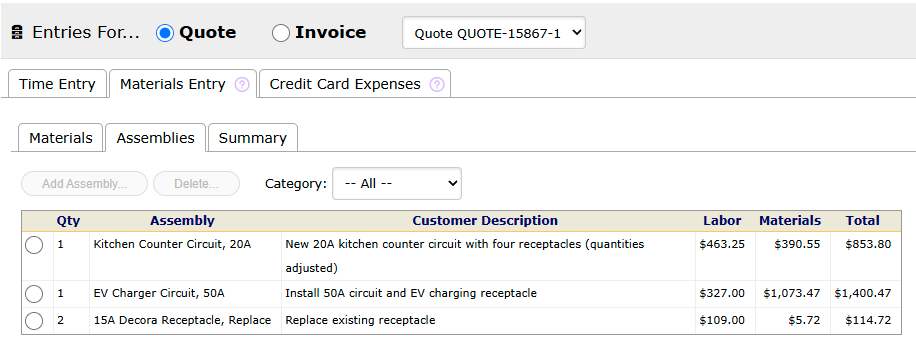
These views are read-only. A quote or invoice you created is locked, so the buttons to add and delete are off and the boxes can’t be changed. To change what you’re billing, work in the New view and make a new document.
Good to know
- Each side remembers its own pick. Switch between Quote and Invoice and each one keeps the document you chose last.
- Credit memos count as invoices. On the invoice side, the list includes credit memos, since their lines are billed lines too.
- Credit card expenses live on the invoice side. On the Credit Card Expenses tab, the drop-down lists invoices.
- Drafts don’t appear. A preview you never saved isn’t a document, so it isn’t in the list.
- Deleted documents drop out. If someone deletes a quote or invoice, its lines go back to New, and the drop-down returns there too.